Built by engineers and CNC programmers for CNC programmers and machinists, NC CodePilot Studio helps you build, visualize, verify, and sync NC code across 2 to 9 channels for Swiss-type lathes, Mill-Turn, or CNC Milling platforms.
HPC
Running high-pressure coolant on your machine?
We also build the hardware. Turnkey HPC coolant kits for Swiss lathes, mill-turns, and CNC mills - fittings, manifolds, and assembled lines shipped ready to install.
Built around the workflows that experienced CNC programmers use every day.
See toolpaths before they cut
3D backplot renders every G-code move in real time. Catch alerts and alarms, verify safety planes, and confirm cycle times before the spindle ever turns.
Coordinate every channel, every spindle
Sync alignment scales up to 9 channels on any multi-channel machine - from a two-tool-post Swiss lathe to a Tornos MultiSwiss. Wait barriers stay aligned across paths, and dedicated main and sub spindle backplots route each toolpath to the spindle it belongs to, so you see exactly when and where every tool engages.
Generate Swiss programs from machine specs
Pick your machine make and model, define part parameters, and the wizard outputs a complete multi-channel program tuned to that lathe's kinematics.
Take the program to the floor
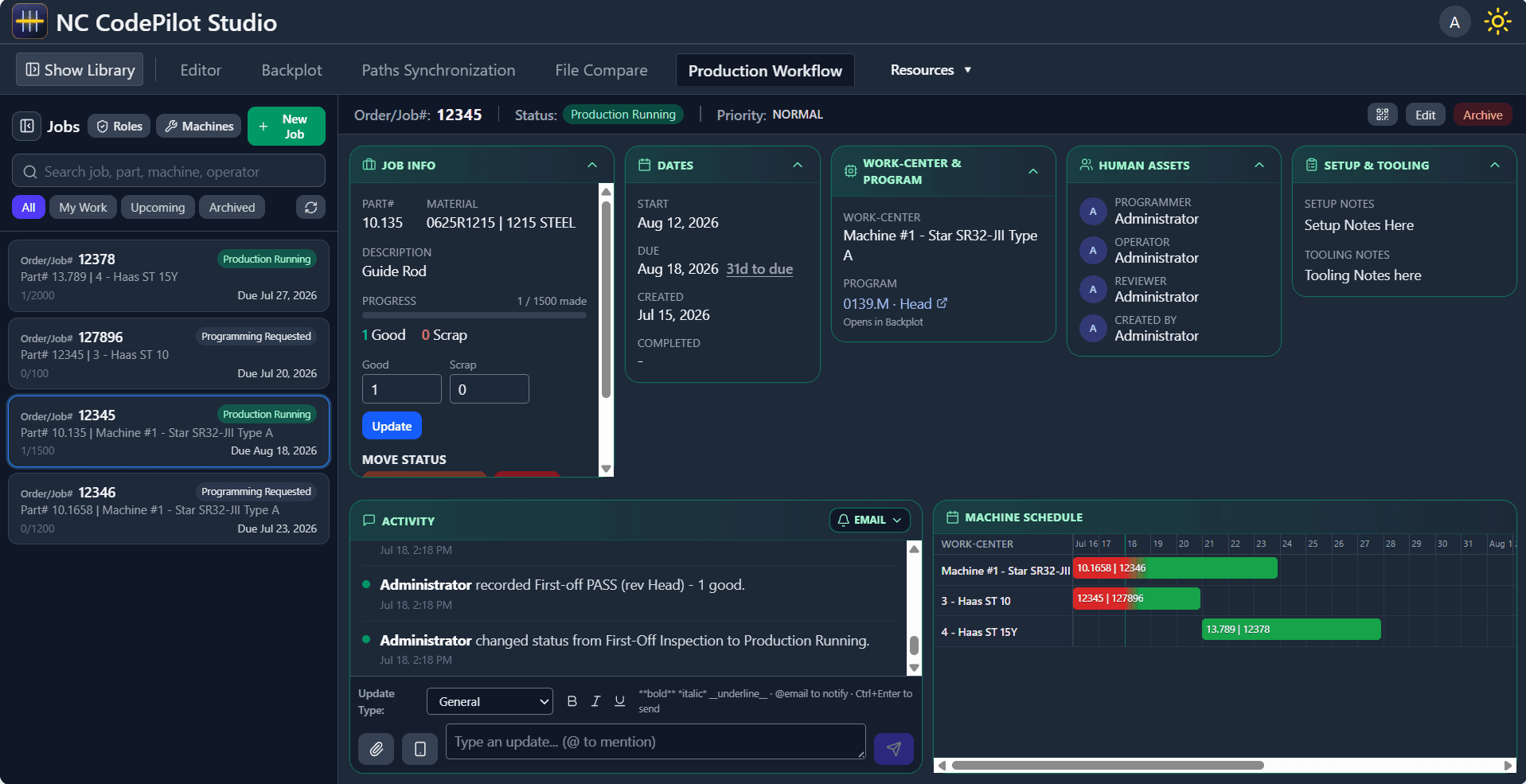
Programming does not end at post. The Production Workflow ties every job to the exact NC program that runs it, so the shop floor, the schedule, and the sign-offs all live right next to the code.
Jobs tied to the program
Every job links to the exact NC program and pinned version that runs it - one click opens it in the backplot - and carries the work-center, part, material, and setup and tooling notes with it.
Schedule the machines
A machine schedule lays every job across your work-centers on a timeline and flags a double-booking before two jobs land on the same spindle.
First-off to production
Move a job from programming through first-off inspection to running, record the first-off result, and Studio flags it if the program changed after the sign-off.
Built for the operator
A tablet-first shop-floor view lets operators log good and scrap counts, read setup notes, and post updates - even on a one-time-code sign-in, with no full account to set up.
Production Workflow is part of the Multi-Path Shop tier and Team plans.
And the details that actually trip up a simulation
The parser reads the cycles and interpolation modes your machine really runs - not just straight lines and arcs.
Machine-aware code reference
Hover help and autocomplete for the G and M codes your selected machine actually uses, plus a Code Library that stays faithful to each maker's own documentation.
3+2 tilted work planes
Tilted work plane / DWO toolpaths rotated into the part frame - make-agnostic across G68.2 / G69, G254 / G255, G605 / G604, and Siemens CYCLE800 - so positional 5-axis features render flat and in place.
Reads your control's dialect
Fanuc-style code (including Doosan, Nakamura-Tome, and Haas variants), Okuma OSP TurnMill (G140 / G141, L-format arcs), Mitsubishi conventions, and Siemens SINUMERIK (CR= arcs, TRANSMIT, MCALL cycles, CYCLE800) all parse without re-posting - the same part plots the same on every control.
Threading & turning cycles
G76 and G78 multi-pass threading plus G32 / G33 / G92 passes, expanded to their real infeed passes in the backplot.
Polar & cylindrical interpolation
G12.1 / G112 polar, Siemens TRANSMIT, and G107 cylindrical moves - including arcs inside the polar section - render the way they cut, with each control's coordinate style handled per dialect.
Real-time feeds & speeds playback
The tool advances at true machining time - per-rev and per-minute feeds, G96 surface speed, and rapids all paced as they run - with a synchronized multi-channel cycle-time estimate.
Fanuc-style macros
IF / GOTO / WHILE, arithmetic, variables #1-#9999, and M98 / G65 subprogram calls - simulated with live variable inspection.
Sub-spindle & pickoff
Work offsets (G54 / G55, and Okuma's native G140 / G141) and pickoff handoff route each toolpath to the main or sub spindle it belongs to.
Compare & version
Side-by-side program comparison and per-file version history, so you can see exactly what changed between revisions.
AE
Loop in your machine builder's application engineer
Keep a shared contact book of the application engineers from your machine builders and dealers, tagged by the brands they support. When you share a program, NC CodePilot Studio suggests the right engineer for that machine and emails them a secure link to open it - view-only or with edit access. Their fixes sync straight back to you, and their copy is removed from their workspace the moment they mark the review Done or you revoke access. Part of the Multi-Path Shop tier and Team-plan collaboration tools.
Plus free engineering calculators - no account required
Including the Bar Stock Calculator (weight, cost, and Material RFQ PDFs for your supplier) and the Material Weight Calculator (per-alloy density overrides and the ISO 513 PMKNSH chip filter) - alongside thread dimensions, surface speed, feeds & speeds, and drill & tap tools, plus a built-in Tooling Hub directory of cutting-tool and workholding vendors.
NC CodePilot Studio is a Multi-Channel CNC Programming & Execution Intelligence Platform. It is a full programming environment for CNC machines - especially Swiss-type lathes, mill-turns, and CNC mills - that combines a multi-channel code editor, 3D backplot simulation, kinematic visualization, Fanuc-style macro support, Swiss lathe template generation, and collaborative file management into a single tool you access in your browser.
What machines and controls does NC CodePilot Studio support?
NC CodePilot Studio supports Swiss-type lathes (Citizen, Star, Tornos), mill-turn machines, and conventional CNC mills. The platform handles 2 to 9 channel synchronization out of the box, which covers everything from a two-tool-post Swiss lathe up to a Tornos MultiSwiss. It reads common control dialects natively - Fanuc-style code (including Doosan, Nakamura-Tome, and Haas variants), Okuma OSP TurnMill (including G140/G141 main and sub work coordinates and L-format arcs), Mitsubishi conventions, and Siemens SINUMERIK (as posted for DMG MORI and other machines) - and normalizes them internally so the same part programmed for different controls plots identically. Machine profiles for specific models determine available features like channel count, spindle configuration, and sync patterns.
Does NC CodePilot Studio read Siemens SINUMERIK programs?
Yes. NC CodePilot Studio reads Siemens SINUMERIK programs (DMG MORI and other SINUMERIK-controlled machines) natively, without re-posting. The parser understands SINUMERIK arc radius syntax (CR=), TRANSMIT face-contour transformations, DIAMON/DIAMOF diameter and radius programming, modal drilling cycles (MCALL with CYCLE81-89), CYCLE800 swivel commands for 3+2 tilted-plane work, spindle-position and spindle-numbered words (SP1=, S1=, M1=), and G70/G700/G71/G710 unit settings. It also simulates SINUMERIK parametric programs: R-parameters (R10=5.2, X=R10, R1=R1+1) with live values on hover, conditional branching (IF with ==, <>, >=, <=, GOTOF/GOTOB and labels), WHILE/ENDWHILE loops, and IF/ELSE/ENDIF blocks. Those constructs are normalized to the same internal form as Fanuc and Okuma programs, so a SINUMERIK program backplots exactly like the equivalent program posted for any other supported control.
Do I need to install anything, or does it run in the browser?
NC CodePilot Studio runs entirely in your web browser - no installer, no plugin, no admin rights required. It works on Windows, macOS, and Linux. For a more app-like experience you can install it as a Progressive Web App (PWA), which also enables offline editing. A separate CAM bridge installer is available for Windows if you want one-click program transfer from PartMaker, Fusion 360, or FeatureCAM.
Do platform updates interrupt my work or lose unsaved changes?
NC CodePilot Studio is designed so that updates do not disrupt work in progress. New versions are rolled out with a build-and-swap process that keeps the platform serving while the update is prepared and limits the changeover to a brief moment, and the app is local-first: your edits are saved on your device as you type and synced in the background, so an update, a page reload, or a dropped connection should not cost you unsaved work. You can also keep editing offline as an installed Progressive Web App, and your changes sync when you reconnect. As with any web service we cannot promise uninterrupted or error-free operation, so for critical programs we still recommend keeping your own backups.
Can multiple programmers edit the same file at the same time?
NC CodePilot Studio supports collaborative editing with a lock-based workflow designed for real shop environments. You can mark a program as a team file so anyone in your company can open and edit it, and the same lock system keeps it safe: one programmer holds the edit lock at a time, others see the file as read-only and can request the lock when they need to edit. A heartbeat system prevents stuck locks, and a built-in review workflow lets a second programmer approve changes before they are released. This is the Multi-Path Shop tier and Team-plan feature set.
Does NC CodePilot Studio support Fanuc-style macros?
Yes. NC CodePilot Studio includes a custom Fanuc-compatible macro interpreter that supports control flow (IF, GOTO, WHILE loops), arithmetic with proper precedence, relational operators, global variables (#1 through #9999), and subprogram calls (M98, G65, and O-number lookups). Macro execution is simulated in the 3D backplot with live variable inspection for debugging.
Is there a free version?
Yes. NC CodePilot Studio has a Free tier with full editing on up to 5 single-path and 3 Multi-Path programs, 2D and 3D backplot, synchronized multi-path playback, the Swiss Template Wizard to explore, program import and export, and access to all engineering calculators. It is free to sign up, no credit card required. Paid tiers (Multi-Path and Multi-Path Shop) raise the program limits and unlock Swiss template generation, cycle-time optimization, collaboration, CAM integration, and advanced features. See the pricing page for details.
Can I bring programs in from my CAM software?
Yes, two ways. You can paste or open files directly in NC CodePilot Studio, or you can install our CAM bridge (Windows) for zero-configuration transfer from PartMaker, Fusion 360, or FeatureCAM. The bridge embeds your company credentials during download, so once installed there is no login or API key to configure. CAM bridges require a Multi-Path or Multi-Path Shop tier subscription.
What does multi-channel synchronization actually do?
On a Swiss-type lathe or mill-turn, multiple tool posts and spindles run in parallel, and their programs must meet at specific sync points (wait codes like M-codes or L-codes) to coordinate. NC CodePilot Studio parses every channel - up to 9 of them for machines like the Tornos MultiSwiss - detects those sync points, and displays the channels in a time-aligned grid so you can see exactly what each tool post is doing at any moment. The 3D backplot simulates all channels simultaneously for visual verification, and a synchronized cycle-time estimate accounts for the slower side at each sync point so the total reflects how the machine actually runs.
Does NC CodePilot Studio simulate threading and turning cycles?
Yes. The backplot expands threading and turning cycles into their actual passes so you can verify them visually. It handles multi-pass threading cycles (G76 and G78) as well as single-block and two-block thread passes (G32, G33, G92), generating each progressive infeed pass in the 3D and 2D views. Pitch, depth, and pass count are read directly from the program.
Does NC CodePilot Studio support polar and cylindrical interpolation?
Yes. For live-tooling and C-axis work, NC CodePilot Studio recognizes polar interpolation (G12.1 / G112, cancelled by G13.1 / G113), Siemens TRANSMIT, and cylindrical interpolation (G107), and renders those moves correctly in the backplot so face and OD features driven by the C axis plot the way they actually cut - including arcs programmed inside the polar section. Control-specific styles are handled per dialect (Fanuc-family diameter-X with a linear C axis, Haas and Siemens Cartesian coordinates), so the same face contour posted for a Doosan, Nakamura-Tome, Haas, Okuma, or DMG MORI machine produces the same toolpath. It also tracks work offsets (G54 / G55, and Okuma's native G140 / G141 main and sub work coordinates) and sub-spindle pickoff, so each toolpath is drawn on the spindle it belongs to.
Can NC CodePilot Studio simulate tilted work planes and 3+2 milling?
Yes. NC CodePilot Studio recognizes tilted work plane / dynamic work offset commands and rotates those toolpaths into the part frame, so 3+2 (positional 5-axis) features on a mill-turn render flat and in the right place instead of floating. It is make-agnostic, reading the equivalent commands across controls - Fanuc and Doosan (G68.2 / G69), Haas (G254 / G255), Okuma (G605 / G604), and Siemens SINUMERIK (CYCLE800) - and the 3D triad and view cube reorient to the active plane so you can verify the setup the way the machine sees it.
Does NC CodePilot Studio explain the G and M codes for my specific machine?
Yes. NC CodePilot Studio includes a machine-aware code reference. Pick your machine and the editor gives you hover help and autocomplete for the G and M codes that machine actually uses, plus a browsable Code Library panel that shows only the codes available on that model - with the meaning faithful to that manufacturer's own documentation (so, for example, a code means what it means on your Star, Citizen, or Tornos, not a generic guess). For supported makes it also shows modal-group context and the related codes that share a group, so you can see which commands are mutually exclusive.
Can I compare two versions of a program?
Yes. NC CodePilot Studio includes a side-by-side comparison view that highlights the differences between two programs - useful for checking what changed between revisions, or reviewing a shared edit before you approve it. Combined with per-file version history, you get a full record of how a program evolved.
Can I get help from my machine's application engineer?
Yes. NC CodePilot Studio keeps a company-wide application engineer contact book - add the application engineers from your machine builders or dealers (Citizen, Star, Tornos, or any brand), tagged by the manufacturers they support, with phone numbers and notes the whole team can see. When you share a program, the platform suggests the right engineer for that machine's manufacturer and lets you send them the program with a message straight from NC CodePilot Studio. They receive an email with a secure link to open it in NC CodePilot Studio - view-only or with edit access - and external engineers are onboarded with a one-time code, with no account to set up. Their edits flow straight back into your workspace, and the moment they mark the review Done - or you hit Revoke - their working copy is removed from their workspace, so an outside engineer never keeps a standing copy of your code. Sharing programs externally is part of the Multi-Path Shop tier and Team plans.
Can I track production jobs and shop-floor status in NC CodePilot Studio?
Yes. NC CodePilot Studio includes a Production Workflow that tracks a manufacturing job through the shop floor and keeps it tied to the exact NC program that runs it. Each job carries its work-center or machine, part and material, assignees (programmer, operator, and reviewer), setup and tooling notes, due dates, and good and scrap quantities, and every change is captured in an append-only activity trail your team can post updates and @-mentions to. A job links to a pinned version of its NC program, so one click opens it in the backplot, and a built-in machine schedule lays every job across your work-centers on a timeline and flags a double-booking before two jobs are scheduled on the same machine. Moving a job from first-off inspection to production records the first-off result, and NC CodePilot Studio flags it if the program changed after that sign-off. Production Workflow is part of the Multi-Path Shop tier and Team plans.
Can machine operators use NC CodePilot Studio on the shop floor?
Yes. Alongside the full programming environment, NC CodePilot Studio has a tablet-first shop-floor view built for operators at the machine. Operators see the jobs assigned to them, read the setup and tooling notes, open the program, log good and scrap counts, and post updates to the job's activity feed. Operators can be brought in with a one-time-code sign-in, so a machinist can use the shop-floor view without a full account to set up. The shop-floor view is part of the Multi-Path Shop tier and Team plans.
Is NC CodePilot Studio suitable for defense or aerospace work?
Yes. For customers with ITAR, CUI, or CMMC Level 2 obligations, NC CodePilot Studio provides file-level classification (Unrestricted / Internal / CUI / ITAR) with US-Persons-only access controls that gate ITAR files, a tamper-evident (hash-chained) audit log with configurable retention and CSV/JSON export, configurable session idle timeout and failed-login lockout, and enterprise single sign-on (SAML 2.0 and OIDC) - all self-serve for Shop and Team customers once the compliance add-on is enabled for your company. On-premises, dedicated single-tenant, and air-gapped deployments, along with our NIST SP 800-171 control mapping and security whitepaper, are available by request. See our For Defense & Aerospace page, or email [email protected].